Summary: BPM 2006 in Mainz Germany

It has been two weeks, but I have been so occupied it is hard to keep up. WfMC held the latest meeting in Mainz Germany, which is near Frankfurt, Sept 26-28 concurrently with the Business Process Management 2006 conference.

On Sept 29, WfMC held BPM Standards Tutorial Day where a number of key coalition members presented details on WfMC and other standards relevant to BPM. This is a relatively expensive event (€1295) so the audience expects a small environment with ready access to the presenters.

I must say that I am pleased that all of the people who volunteered to create content for this event all successfully delivered excellent presentations. It happens so often with volunteer organizations that people flake out, but certainly not this time, and I believe this is a sign of vitality of WfMC and the value that these members see in helping to spread information about the WfMC work.

Tom Baeyens who heads up the JBoss jBPM initiative attended the tutorial day, and it was a pleasure and an honor to meet him in person. He wrote up a nice summary of the event on his blog. He accurately points out that WfMC needs to do better in public relations (I would have sayed HYPE) than contenders such as BPEL. So true. But at least WfMC has maintained credibility over the long haul.

WfMC now has a new executive director: Nathaniel Palmer. Founder and President at Transformation+Innovation, and a long time analyst in the BPM space. He has some great new ideas for increasing the effectiveness of the coalition at getting the message out. Of course, it would be hard to completely replace the excellent service that Layna Fisher was bringing to the coalition for the past 5 years, we were glad to hear that Layna will continue to organize and run the Workflow Handbook part of the WfMC.
This day also represent a trial run for a series of tutorial days planned end of October beginning November in three cities in Asia. Information is now becoming available for this:

Oct 30, Tokyo:
http://www.gmacjapan.com/bpm/

Nov 1, Taipei:
http://www.flowring.com/pagelogic/en_index.jsp?pl=in000000000000en

Nov 3, Singapore:
http://www.bizmann.com/wfmc_fareast_tour.htm

More information coming soon.

CFD: Content-Free Documentation

Have you ever been using a high tech product or software application, and ran across a command or prompt which you did not know, went to the help, and found a help entry, but that entry actually tells you nothing? For example, you see a menu called “XXX” and you wonder what it does, so you go to the help or the manual, and look it up. The entry says (and I quote) “In order to XXX select the XXX Menu.” This is Content Free Documentation. Continue reading

BPM Standards Tutorials, Sept 29, Germany

Key members of the BPM standards community are coming together in Mainz Germany on September 29 to present six hour-long tutorials on subjects relevant to getting BPM system to work together. The tutorials range from general overview of the BPM market, to specific detailed presentations on standards. For those vendors who are already familiar with BPM there is an interactive XPDL design strategy session to discuss specific implementation approaches.

This is presented as part of Business Process Management 2006 which is a four day event, the BPM Standards will be presented on the last day, Friday. While the first three days are primarily in German, the BPM Standards day will be presented exclusively in English.

The schedule is:

  • 09:00 Welcome and Introduction
  • 09:10-10:00 BPMN/XPDL overview
  • 10:00-10:45 BPMN/XPDL details
  • 11:15-12:00 Human BPM (workflow) vs. EAI BPM (Service Orchestration)
  • 12:00-13:00 Lunch
  • 13:00-13:45 What is BPM? What is Workflow? The Business Value of BPM & Workflow.
  • 14:00-14:45 Relationship between BPM and SOA – How to leverage what you have.
  • 15:15-16:00 XPDL vs. BPEL
  • 16:00-16:30 Panel Session, Q&A, Roundup, Feedback

The presenters include Jon Pyke (WfMC Chair), Robert Shapiro (Global360), Keith Swenson (Fujitsu), Saša Bojanic (ProZone), Justin Brunt (TIBCO), Ken Mei (Global 360), Philippe Betschart (W4 Global), Philip Larson (Appian Corp), Thomas Olbrich (Chair Business Process Management 2006), and draws upon work created and helped along by the Workflow Management Coalition.

Here is a detailed schedule of the presentations. Hope to see you there!

Please Don’t Disable My Menu Options!

Well, I am back from a wonderful vacation in Tuscany. Just a week in a small apartment in the countryside there, I highly recommend it. But back to work: I started this post before leaving, and it is time to finish it up……

One problem has bugged me for many years. It is another one of these things where the “conventional wisdom” is misguided. There must be other people hold my position, but because all of the terms are so generic, it seems to be impossible to google for other pages on this topic. So please, if you know of other discussions on this topic please make a comment with a link.

Background

Early 1980’s saw the first modern graphical user interfaces. The Macintosh sported menus that drop down from the top of the screen. One UI guideline was ingrained into the common GUI consciousness:

If a menu option is not immediately available for use, disable the option, and indicate this by changing the color to grey.

Is this good? Is this bad? The visual indication is clearly good. By why do you have to disable the menu? Menu options that are disable can not be selected; they can not be acted upon; they can not tell you why you don’t need that option. Disabled menu items are completely dead and silent about why they are disabled.  It can take minutes or hours to figure out why an option is disabled.   I hate this.

User Protection

Why do we disable menu items? The response is usually along the line of “protecting” the user. People (users) are afraid of computers and applications; people can accidentally do the wrong thing and cause problems, so in order to make a more friendly and comfortable environment, we should only offer them operations that make sense at the time. Thereby preventing people from accidentally using the wrong option. In summary, we need to protect people from doing the wrong thing.
Protecting the user makes sense, but it ignores a critical aspect: users need to learn the system they are using. No, Virginia, people don’t read the manual. The point of a friendly user interface is that you can use the product without attending a training course. Just start using it and learn by experimentation. If you want to (graphically) re-size the object you are working on, look around for a menu option that looks appropriate, and try it. Oops, it was not what you wanted, no problem there is the “undo” command. A well designed application can be learned by trial and error.

If I do something completely ridiculous, it is not because I am a “bad” person who needs to be restrained or punished, but it is because I don’t understand the model/metaphor that the program is presenting to me. Therefor, the appropriate response that a friendly program should make is to explain: (1) what the operation does, (2) what it requires to operate correctly, and (3) why I have not met this condition. Through my exploration of the program, this kind of response will actually help me have a better understanding of the program, and it will help me use it better. I was still prevented from doing the ridiculous operation, but instead of a simple dead menu item, I got a pop-up error message that explained why I can’t use that operation. Once I learn that a particular path of action does not make sense, I will not use it, not because I was prevented, but because I will understand the program.

Simply disabling the menu option does not help me in this way. Due to my misunderstanding of the system, I THINK I need to use a particular command, but it is disabled, so I now believe that program is wrong (not me). A disabled menu gives me no information to teach me what I should be doing instead. I am forced to go outside of the system, maybe even look something up in the manual, or most likely bug a coworker who knows the program, and find out externally why the system does not work for me. In the end, my misunderstanding of the system will be corrected, and I will come back to use the system.

An Example

Some simple examples. I use a photo-graphical program that allows you to increase and reduce the color depth of the image. For example, a JPG is 16 million colors, and you have an option to reduce the image to 256 colors. Once you reduce the image to 256 colors, the option to reduce becomes disabled. This makes sense to anyone who understands what is going on, but what about who does not understand? The user wants to do something, and thinks it is called “reduce colors” but the menu is disabled. The user is left on his own to discover why the menu is disabled. Maybe the user (1) thinks the command does something other than it does, or (2) does not know that the image is already in 256 colors. Imagine how much nicer the program would be if when he chooses this option, it pops up an explanation about how the picture is already 256 colors, and this operation only works when the image has more colors than this. It is nice to have the menu gray as an indication, but disabling prevents me from learning how the program works.

The same program has filters (smoothing, etc) that work only when you have a 16 million color image. With a 256 color image, when you try to use a filter is it not disabled. Instead, a window pops up telling you that the filter options only work with images with 16 million colors. This is so much more helpful than simply disabling the menu.

Preventing Error Messages

It gets worse. Many software QA people believe that “preventing users for making mistakes” is extended “preventing users from ever experiencing a pop up error message”. I don’t know how many times I have heard someone say: “If the user is only going to get a pop-up error message, then the button should be disabled.” This is actually a codified rule in the Fujitsu software quality standards.

What is the matter with users getting harmless pop up error messages? The answer is simply: usually these error messages are completely useless. They do not explain anything about the program, and often end up blaming the user for being “bad”. They often use techno-jargon, or worse, simply contain an “error code” which is meaningless to the user.

So in summary, our programs are so poor at teaching users how to use them, that we go and prevent the most important way that people learn: trial and error. Please note: trial and error does not work without the error part. When my dad took me skiing when I was young, he always said “if you don’t fall down at least once every day, you are not trying hard enough.” It is impossible to design a program where everything that can be tried will be successful. It is those error messages that are the learning experience.

Common Lore, Fighting the Good Fight

Most intelligent people can understand the above reasoning, and will agree that good, well designed error messages are helpful for people to learn the program. But the rule to disable menu items still exists.

Try searching google for “disable menu” and you will find thousands of messages from people seeking to find ways to disable menus, and to find code support for disabling menus. Here are some examples:

  • “As user security may not permit a user access to a specific menu option(s) we need to disable them so if the user clicks on the option nothing happens.”
  • “I am working with the BasicMenu sample and would like to disable my menu entry, when no document is open.”
  • “You can use system policies to disable menu commands and their corresponding toolbar buttons. When you disable a menu command and toolbar button through a policy, users cannot use that command or button.”
  • “Does anybody knows how to disable the menu when you click the right button on your mouse? This is to control the desktop display for PCs meant for the public. Do we need special software?”
  • “if there’s nothing in the clipboard (state), then the Paste command should be disabled (menu).”
  • “if your program is in read-only mode, then commands that edit should be disabled…”
  • “Obviously, if there is no selected object at all, you’ll want to disable the menu item, thus reinforcing the connection between the item and its object.”
  • “visually disable menu item(s) which the user not allow to activate.”
  • KDE UI Guidelines: “If an action should not be executed (e. g. Cut when nothing is selected) then you should disable the entry in the menu.”
  • Eclipse GUI guidelines: “A command should only be enabled if it can be completed successfully. If this is not the case, the command should be disabled.”
  • GNOME UI: “Sometimes it does not make sense to allow the user to interact with a control in the current context, for example, to press a Paste button when the clipboard is empty. At these times, make the control insensitive to minimize the risk of user error.”
  • NASA UI Guidelines: “Dim (or gray out) unavailable or invalid options.”
  • Apple UI Guidelines: “When a menu item is unavailable—because it doesn’t apply to the selected object or to the selected object in its current state, or because nothing is selected, for example—the item should appear dimmed (gray) in the menu and is not highlighted when the user moves the pointer over it.”
  • SGI UI Guidelines: “In general, disabling entries when selecting them would give the user an error message. For example, if a menu entry works on a selection (such as “Cut” and “Copy”), disable it if there’s no current selection. “
  • Sun GUI Guidelines: “Disabled commands have dark gray text (instead of the usual black) on the usual light gray background. They are completely inoperative and are not highlighted in response to user actions.”
  • Java Look and Feel Design Guidelines: “If an application feature is not currently applicable, make the corresponding menu item unavailable and dim its text. When menu items do not apply to the current context, they are dimmed and cannot be activated. Keyboard navigation skips over them.”
  • Microsoft Official Guidelines for User Interface Developers and Designers: “If a menu item is not appropriate or applicable in a particular context, then disable or remove it. Leaving the menu item enabled and presenting a message box when the user selects the menu item is a poor method for providing feedback.”
  • Smith and Mosier HCI Guidelines: “When function keys and other devices are not needed for current control entry, and especially when they may have destructive effects, disable them temporarily under software control so that they cannot be activated by a user.”
  • “On the other hand, if the option is not available for a reason the user has no control over, then remove it. Otherwise the user will go nuts looking for the magic way to enable it.”

Everyone is looking for ways to disable menus, and disable means to make it non-functional or “dead”. I would claim that in everyone of these cases, the program would be far more helpful to people learning it if a pop-up message would tell them why the command is not useful at the moment, but the code libraries to support menus do not work this way!

How do we change this? Disabling menu items seems to be one thing that the common programmer pick up, but misapplies. It seems to be a simple thing for Quality Assurance people to check for and insist be changed.  How can this be corrected?

There may be guidelines existing that concur with my position, but I can’t find them! Searching the web only yields millions of cases of people trying to figure out how to disable menu items. I am looking for something telling people to NOT disable them.

I did find some things:

  • Bruce Tognazzini calls this the “Mysteriously Dimmed Menu Items” problem: “Bug: Designers offer no way for users to discover why a given menu or option has been dimmed (grayed out), nor how to turn it back on.    Proposed Fix: Make grayed-out objects clickable, revealing what has caused the object to be dimmed and what the user can do about it.”
  • GNOME UI guidelines: “Do not disable menu titles. Allow the user to explore the menu, even though there might be no available items on it at that time.”
  • Palm OS Guidelines: “Never dim or gray out a button to show that it does not apply to the current situation. If the button depends on a certain user context, display an alert dialog that explains why the button does not apply. For example, To Do List has buttons at the bottom of the main form that apply to the currently selected task. If the user has not selected an item, tapping one of the buttons results in an alert dialog explaining how to select an item”
  • Sun UI Guidelines: “When an application is in use, it is not uncommon for commands to have no valid function. For example, when a text editor does not have any documents open, its Save and Close commands have no function. In situations like this, a menu command that has no current function should either be disabled or it should open a panel explaining the function is not currently available.”
  • Apple Guidelines suggest a help balloon to explain why a menu item is dimmed: “Remember that the help balloon you provide for a dimmed menu item should explain why it isn’t currently available or, if more appropriate, how to make it available.”
  • Mark Levinson agreed: “we gray out menu items when they’re not available but don’t do anything to tell the user why they were greyed out.  So the user is expected to use their innate genius and grok why the item is greyed out.  What we really need is for industry behemoth (is MS listening) to help solve this problem.  We need both a standard UI guideline and BCL classes that implement it. “

Call to Action

I can’t be the only one with this opinion. Please use the comments on this message as a way to collect links to UI guidelines that concur with this position. If you know of a good UI article stating when it is bad to disable menus, PLEASE enter a comment with a link to that article. If you know of a discussion of this topic anywhere, PLEASE make a link to that discussion in a comment. I would greatly appreciate it.

What BPM can learn from a Spreadsheet

Business office workers will never program software!or will they?

There is an interesting tension in the undercurrents of the high-tech industry. On one side you have vendors that make bold statements about the productivity that will result because all office workers will be able to make applications by themselves. On the other side you have the insider cognoscenti who chuckle at the thought of untrained people attempting to do more than the simplistic examples offered in the flashy demos. Continue reading

BPM Philosophy, not Technology

Found another interesting and thoughtful discussion of terminology: Workflow or Process Management. I like the six sided cube analogy, and I agree that BPM includes all those aspects. In this view again “workflow” is equated with the human dimension. The only critique I have of the post is: once you include all 6 facets, is there anything in the technical universe that is NOT BPM? Continue reading

Office Automation 25 Years Later

At the last WfMC committee meeting, we were honored by a visit from Skip Ellis, a luminary in the field for 25 years. Huh? I hear some of you exclaim. There wasn’t any BPM 25 years ago! Let me explain.

During the 1970’s people got the idea that information technology (called simply “computers” back then) could be used to support people at work. The idea is that the computer would figure out what needs to be done, and tell people when they needed to do something, Continue reading

Throw Out the Diagram?

I ran a “Round Table” at the BPM ThinkTank on the subject of BPMN and XPDL. There always is the question: “Why not use BPEL?” Then I explain how XPDL holds the graphical layout, the X & Y coordinates, the size the nodes, the paths of the lines. BPEL has not support for the graphical layout.

“But you don’t need to save the graphical layout!” Continue reading

The BPMN-XPDL-BPEL value chain

I got the chance to participate on a panel session at the BPM Think Tank in Arlington VA on May 24 2006 on the subject of BPM Standards.  Richard Mark Soley was on one end representing OMG and the BPMN standard. John Evdemon from Microsoft was on the other end representing BPEL for which he is the TC Co-Chairman. I was between them representing XPDL from WfMC. The order was random (although Richard suggested we were ordered by height) but as it turns out this is a natural order of progression for use of these standards.  Sandy Kemsley described this as the “BPMN-XPDL-BPEL value chain” in her post about that panel session. (Thanks Sandy for the term!)
Many people today automatically assume that BPEL and XPDL are direct competitors. This is not at all true. BPEL and XPDL are entirely different things for entirely different purposes. I will repeat that statement a few times here to emphasis it. But first, and quick summary of how they are different.

BPEL is an “execution language”. It is a programming language that has variables and operations. The operations can send and receive SOAP messages, and there is strong support for XML and XML transformation. It has constructs that make it easy to call multiple web services at the same time, and synchronize the results. It does not have any concepts to support the graphics of the diagram; activities do not have a position and size, and there is no representation at all of an “arrow”.

XPDL is a process design format. It is a file format that represents the “drawing” of the process definition. It has X & Y coordinates and node size. It has a concept of lines, and points along the line that give it a particular path. The nodes and lines have attributes which can specify executable information such as roles, activity descriptions, timers, web service calls, etc. XPDL 2.0 contains extensions in order to be able to represent all aspects of BPMN (BP Modeling Notation). The goal is to be able to save and exchange the process diagram.

The goal of BPEL is to provide a definition of web service orchestration, the underlying sequence of interactions, the flow of data from point to point. Ultimately BPEL is all about bits and bytes being moved from place to place and manipulated. It does not however attempt to represent the drawing that you used specify the orchestration.

The goal of XPDL is to store and exchange the process diagram. It allows one process design tool to write out the diagram, and another to read the diagram, and for the picture that you see to be as similar as possible. It does not, however, guarantee the precise execution semantics. As you see, BPEL and XPDL are entirely different things for entirely different purposes.

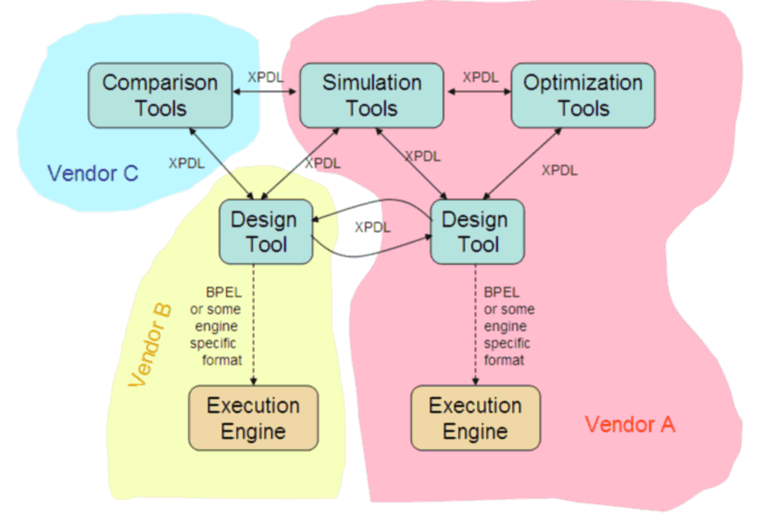
The different usage is best represented the diagram below. At the top are various design level tools. At the bottom are execution environments. XPDL can be used to carry the design from design tool to design tool. BPEL, XPDL, or other formats might be used be used to communicate the executable process to the engine. Generally, a vendor specific design tool is necessary to translate the design into an engine specific format. Generally, it is not possible to take executable code from one vendor’s design tool, and execute it in another vendor’s engine. Even with BPEL, which many believe was for this purpose, does not at this time allow different engines to run identical copies of BPEL code.

Diagram A

The XPDL file can provide this design interchange because it offers one for one representation of the original BPMN process diagram; it can be written, and re-read to recover the original diagram. BPEL, on the other hand is a non trivial mapping which is widely recognized as being one directional: you can take a BPMN diagram and produce BPEL, but it is difficult or impossible to recover the original BPMN diagram from the BPEL. This is not surprising since it was not designed for process design interchange.

Process interchange is ver important to customers who are investing a tremendous value in their process diagrams, and do not want to locked into a single vendor. (The vendors may desire this lock in, but never forget that the customers are paying the bill and have a choice.)

The importance of process design interchange will increase as the market matures. Currently, without design exchange, a single vendor must supply all of the tools that an organization might use. As the market matures, we can expect to find specialized tools that provide one function better than the vendor providing the engine. Or there will be people who are trained on a special tool and don’t want to lose that skill to pick up a new vendor version. The result is that we see a complete ecosystem of specialized tool that all work at the design level. This might be depected as below:

Diagram B

You might ask, if BPEL does not manage to communicate the execution representation to various engines with complete fidelity, why then would we expect XPDL to exchange the process diagram with complete fidelity? The answer is simply that is does not need to. One design tool does not understand the output from another tool completely, but every design tool will understand the most important parts (the form and shape of the diagram) as well as many standard BPM attributes. Because the model is communicated from design tool to design tool, if the transfer is not perfect, you have a chance in the receiving tool to fix it up. Not perfect, but both useful and pragmatic.

Not every tool needs to understand the complete diagram. A simulation tool for instance will use the standard parts of the diagram, but probably ignore things like the attributes that define web service calls, since simulation does not need to know this.

One of the most important aspects of XPDL is the extensibility mechanism. Each tool has specialized requirements on the diagram, it can represent these using extended attributes. Other tools will not understand these extensions, but they will carry the extensions along. Thus a tool specialized to clean up the layout, might manipulate the graphical aspects of the model, and return a cleaned up model including all the extensions back to the original source without losing any information. Enhydra JaWE for instance is an open source XPDL editing tool has been publicly demonstrated to read an XPDL file from Fujitsu’s Interstage BPM, edit, and return without loss of vendor specific extensions. JaWE even allows you to view and modify the extended attribute values.

Some execution engines take XPDL directly. Fujitsu’s Interstage BPM does because it is workflow style BPM and it is important for human activities to retain their identity even while executing, so that run time modification and process migration can be readily supported. That is the choice that a particular engine makes.  Some of the more EAI-style engines may use BPEL, but even in that case the portability is not proving viable, and some engines are going straight to the underlying technology such as Java, C#, Ruby, etc.

These are the differences in the roles of these three important standards. Our sitting order on the panel was appropriate and fitting because users will usually start by drawing a BPMN diagram, saving the partial diagrams as XPDL during development, and ultimately translating to BPEL for transmission to an EAI style BPM engine. These are three very different and very compatible roles.  But remember this: BPEL and XPDL are entirely different things for entirely different purposes.